Explore the app
Browse the tool categories and open NFC.
The phone is the brain · the ESP32 is the antenna
ESP32 firmware and an Android app for radio and security research.
Flash from desktop Chrome or Edge with a data USB cable. On Android, use the app’s USB flasher. Install activates when a matching release image is available; it is first checked against the size and SHA-256 the release lists (older releases without a digest are shown as unverified).
Brucia is a fork of Bruce. The ESP32 handles radio timing and capture; the Android app handles storage, analysis and the interface. The device also works on its own.
Start with the connection guide. The previews below use fixture data; they are not phone captures or evidence of a physical radio effect.
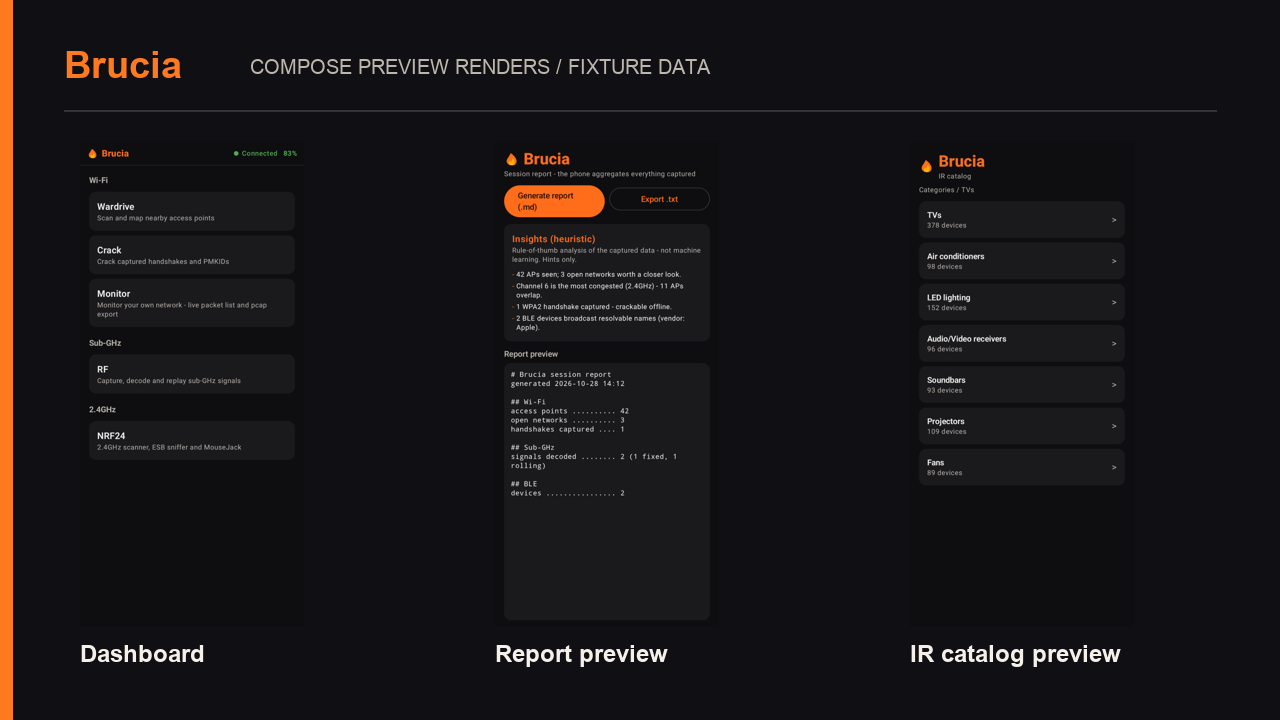
Screen recordings of the released Android app, version 0.1.12, running in an emulator. Real navigation, downloads and results. The WPA demo uses synthetic data; no radio or NFC device is connected.
Browse the tool categories and open NFC.
Watch the app check a synthetic handshake and find its known demo passphrase.
Download Flipper and Proxmark3 lists and see duplicate keys removed.
This comparison describes implemented features. Hardware support varies by board; many paths still need end-to-end testing. See the test checklist before relying on a feature.
| Capability | Flipper Zero | Bruce | Brucia LilyGo T-Embed CC1101 |
|---|---|---|---|
| Wi-Fi | External Wi-Fi board | Native ESP32 Wi-Fi | Native; phone-side maps, capture analysis and workflow |
| BLE | Built in; mobile app and community apps | Built in; board-dependent tools | Device radio plus Android analysis and controls |
| Sub-GHz | CC1101 with supported protocol library | CC1101 on this board | Same radio; protocol coverage and RF performance require individual verification |
| NFC 13.56 MHz | ST25R3916; card-specific reading/emulation | PN532 on this board | PN532: compatible reads/writes, Type 4 NDEF and identity-only FeliCa target paths; no universal emulation |
| RFID 125 kHz | Native read/emulate/write for supported tags | No stock LF hardware | Unavailable on stock T-Embed; compatible add-on integration required |
| iButton | Built-in contacts and supported protocols | No stock contacts | Unavailable on stock T-Embed; hardware/interface support required |
| Infrared | Built-in TX/RX | Built-in TX/RX on this board | Device TX/RX with phone catalog and custom layouts |
| Audio | No built-in microphone | Board microphone/speaker and audio tools | Existing DSP, SSTV RX/TX, DTMF, scope and RTTTL composer; physical signal chain pending |
| NRF24 / LoRa / FM / Ethernet | External hardware where supported | External modules where supported | Optional modules; presence and operation support gate each tool |
| Mobile workflow | Official mobile app exists | Primarily device UI / WebUI / CLI | Native Android companion; phone compute, storage, GPS and display |
| Firmware updates | Official update tools and mobile workflow | Board-specific distribution | Release parsing/download/flash code; final installation and recovery acceptance pending |
| Power | Standalone battery | Standalone board battery | USB power depends on phone/OTG/cable; also consumes the phone battery |
| Infinite battery · SERIAL-KILLER | Finite | Finite | Powered by your phone. The phone has opinions. |
Stock hardware compared; optional add-ons are listed separately. Support varies by board and operation. Read the comparison, limits and primary sources.
Use desktop Chrome or Edge with a USB data cable. Install choices come from the published release.
Downloads are resolved from the public release. Check the selected board, version and verification status; unavailable assets keep installation disabled. Historical bundled files are not a fallback. A published build does not certify every physical function.
Checking published firmware assets...
Chip family: ESP32-S3
The LilyGo T-Embed CC1101 is the reference board; final hardware acceptance of current builds is pending. Other configured boards are experimental - treat it as experimental; it may not boot or some features may not work. For a normal failed firmware write, if the board will not start, hold BOOT and press RESET to re-enter download mode, then flash again.
Source build: python3 tools/build_firmware.py -e lilygo-t-embed-cc1101. See the repository guide for uploading.
Do this after step 1 has flashed Brucia and the device has rebooted into it. From then on you can update the firmware itself from inside the app - no need to re-flash from the browser.
For authorized security research and education only.
The device captures and transmits; the phone brings compute, storage, GPS and a full GUI. Everything below is for authorized security research and education only.
Brucia's distinctive workspaces combine Android audio/DSP and SSTV, persistent Wi-Fi/BLE history and place comparisons, phone-side WPA dictionary verification, and an HTTP/HTTPS inspection proxy. De Bruijn, spam, replay and remote control are included tools, not claims of exclusive invention. Read the source-backed comparison.
Wardrive with phone GPS and exports; WPA/WPA2 handshake and PMKID dictionary verification on Android, with wordlists and candidate rules. Device tools include deauth, sniffers, beacon spam, monitor capture and ARP MITM.
Inspect HTTP and HTTPS on configured lab clients with a local CA. Clients must trust that CA; certificate pinning can prevent inspection.
Capture to CSV, a rolling-code-aware decoder, .sub import and export, De Bruijn brute force, a spectrum waterfall, replay, jammer and radio config.
PN532 tools for compatible tags: reads, NDEF writes, dump comparison and selected emulation paths. Support depends on the card type and operation.
Remote catalog, signal learning, TV-B-Gone, raw replay and IR power spam, with one shared run across the IR screen and Spam hub. Receiver response requires a physical check.
Scanner, an advertisement spam hub (Apple, Android, Windows, Samsung), a GATT explorer and BadBLE.
With the 2.4 GHz module attached: channel scanner, Enhanced ShockBurst sniffer, jammer and MouseJack.
On-device JavaScript, iButton, clock, speaker and mic, mic spectrum and ESP-NOW, plus phone-side session reports with OSINT and insights, a live console, a file manager and a remote screen mirror.
Update the app over the air and flash new device firmware over USB, straight from inside the app.
Driven by the ESP microphone and speaker: live spectrum, a waterfall spectrogram, an SSTV decoder and transmitter (Robot36 and more), a tone and DTMF detector/generator, and an oscilloscope.
The device reports module capabilities; unavailable tools are disabled. Driver initialization and a physical end-to-end test are recorded separately in the verification checklist.
Everything runs on your phone and the device. No accounts, no analytics, no telemetry; nothing is collected or stored on our servers and your captures stay on your phone. Network access is used for updates, optional datasets, map tiles and services you choose, including WiGLE and network research tools.
Your first connection, your next experiment, or your first contribution. Start here.
Built something useful? Found a rough edge? Help improve a guide, share a device check or contribute a fix. Read how to get involved.
No ads, no paid tiers, no telemetry. Support is purely optional.
Captures are stored on your phone. Updates, map tiles, optional datasets and services such as WiGLE use the network. Uploads and exports are actions you choose.
Buying the board through the affiliate link also supports the project.
Bitcoin
bc1qee8a06x886ng8ce6qy84l6u6x54jnjsesgqym7
Monero
46qDyafRkn1at3E2GMwuESBeqzpt74xE8S2kjPe35EUyKiS57Ho7cLB1vD2zH4hPmjYcYzWWxSSLZAYB5Hp1yDFrKnPWkR7